
GPS Tracker for Android Phone (2026) | Accurate Real-Time Tracking

-
01GPS trackers work independently while your phone only displays the data
-
02Bluetooth trackers cannot provide long-range real-time tracking
-
03App performance affects how reliable tracking feels in daily use
-
04Power source determines whether charging is required regularly
-
05Faster updates improve tracking but reduce battery life
GPS Tracker for Android Phone: Real-Time Location Tracking You Can Rely On

GPS trackers for Android phone buyers usually want one simple thing: open an Android app and see an exact location without delays or guessing. Phone-based tracking tends to fail during real trips and real emergencies. Battery drops. Signal cuts. Location freezes. Meanwhile, you sit there refreshing the map, hoping it catches up.
This guide focuses on GPS trackers that actually work with Android apps, not shortcuts or Bluetooth toys. You'll see how proper GPS devices send live location to your phone, why accuracy varies between trackers, and which models stay reliable after weeks of use. You'll also learn what to avoid before money leaves your wallet. By the end, you'll know exactly which tracker fits your situation and why.
What Is a GPS Tracker for an Android Phone?
A GPS tracker for an Android phone is a separate tracking device that sends live location data to an Android app using GPS satellites and mobile networks. Your phone does not do the tracking. The tracker does the work, and your Android app shows the result on a map.
This distinction matters early because many people assume an Android phone handles tracking by itself. Once the phone loses battery or signal, tracking stops cold. A proper GPS tracker keeps reporting location whether your phone stays on or not.

How GPS Trackers Work With Android Devices
A GPS tracker works as a small computer with a GPS receiver and a mobile data connection. The tracker locks onto satellites, calculates location, and sends that location to a secure server. Your Android app pulls that data and displays movement in near real time.
Mounted inside a car, backpack, or toolbox, a GPS tracker keeps reporting even while a phone sits at home on Wi-Fi. Your phone becomes a viewer, not a weak link in the tracking chain.
GPS Trackers vs Android Location Sharing
Android location sharing depends entirely on the phone being alive and connected. Once the battery drops, tracking ends. Once the signal fades, the map freezes.
GPS trackers avoid that failure point. The tracker carries its own power, GPS hardware, and data access. Android location sharing works fine for casual meetups. GPS trackers work for vehicles, valuables, kids, and recovery situations where accuracy and continuity count. When stakes rise, dedicated hardware beats phone-only tracking.
Key Features That Matter in a GPS Tracker for Android

A GPS tracker for an Android phone lives or dies by performance, not marketing claims. Weak features create bad tracking, no matter how good the app looks. Here are the features worth checking before trusting a tracker with real-world use.
1. Real-Time Location Updates
Update speed refers to how often the tracker sends location data to your Android app, and it decides whether tracking feels useful or useless. Faster refresh rates show movement clearly. Slower rates cause map jumps and delays.
Trackers updating every few seconds show turns, stops, and direction changes cleanly. Trackers updating every few minutes feel blind during motion. Faster updates use more battery, but accuracy improves noticeably.
2. Location History & Playback

Location history stores past movement so you can review routes later. Families use history to check school trips or walking paths. Vehicle owners use playback to review routes, stops, and parking locations.
A solid tracker shows clean, continuous paths instead of scattered dots. Messy history usually signals weak GPS reception or poor data handling.
3. Alerts, Geofencing & Emergency Triggers

Alerts turn tracking into protection. A good Android GPS tracker sends a notification the moment something changes: movement starts, speed increases, or a set boundary gets crossed.
Geofencing lets you draw a simple boundary on the map. If a car or person moves in or out of that area, your phone alerts you right away. This works especially well for vehicles and kids.
Emergency buttons add extra safety. With one press, an alert goes straight to your phone, which can help seniors or solo travelers get attention fast. Alerts are essential, not optional.
4. Battery Life & Power Options
Battery life decides how often you end up checking on a tracker instead of trusting it. A GPS tracker that dies early turns accurate tracking into a guessing game. Power options matter just as much as GPS quality, because how a tracker stays powered determines how long tracking continues without interruption.
Rechargeable trackers work well for bags, people, or temporary setups, but they demand a charging routine. Miss one charge, and tracking stops. OBD-powered trackers connect directly to a vehicle and run continuously, which removes battery anxiety entirely.
Replaceable-battery trackers sit in the middle. They last longer between maintenance and suit low-movement tracking, where constant updates aren't required.
Choosing the right power style comes down to how often movement happens and how much attention you want to give the device.
5. Coverage & Connectivity
Coverage decides where a GPS tracker can keep sending location updates. A tracker may work perfectly in one area and struggle in another, depending on the network behind it.
Most Android GPS trackers use LTE or LTE-M mobile networks to send location data, which offer strong coverage across cities, highways, and most towns. For tracking outside one country, the tracker also needs international roaming support, or updates stop once borders are crossed.
During long drives, weak carrier support shows up fast. In rural areas or on remote highways, trackers tied to limited networks often stop updating or delay location reports. Trackers with broader network support keep sending data as surroundings change.
6. GPS vs Bluetooth Tracking

This difference causes more confusion than anything else, so let's keep it simple.
Bluetooth trackers only work when a phone is nearby. The tracker sends a short-range signal, and your Android phone picks it up. Once that tracker moves out of range, usually a few rooms, a building, or a short walking distance, location updates stop. You only see the last place where the phone lost contact.
GPS trackers work very differently. A GPS tracker uses satellites to know where it is and cellular networks to send that location to your Android app. Distance doesn't matter. The tracker keeps reporting location whether it moves across the street, across the city, or across the country.
Bluetooth works well for finding keys inside a house. GPS works for cars, people, bags, and anything that moves far away.
If your goal is real-time tracking on Android, not just knowing where something was last seen, a GPS tracker is the option that delivers.
Best GPS Trackers for Android Phones (2026 Rankings)
Choosing a GPS tracker for an Android phone gets easier once real specifications and use cases replace guesswork. These rankings compare how each device performs with an Android app across daily driving, long parking periods, and everyday movement scenarios, where tracking either stays reliable or falls apart.
The ranking focuses on one thing: how well each GPS tracker works with an Android app for accurate, dependable location tracking. No Bluetooth-only shortcuts, no phone-dependent tricks. Each option below fits a specific use case, so you can match the tracker to your situation instead of guessing.
#1 SpaceHawk GPS Tracker - Best For Accurate Android Tracking

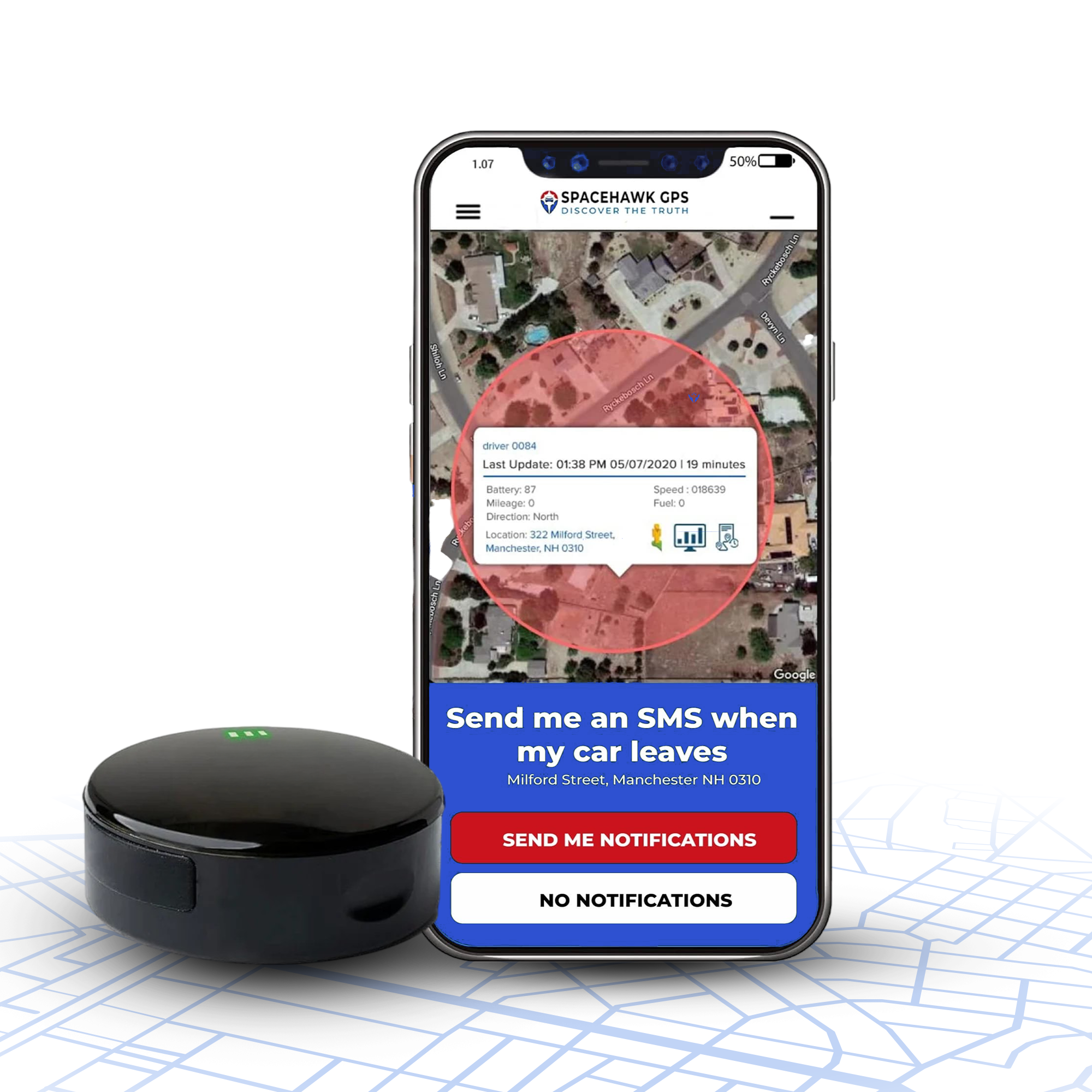
SpaceHawk is a real-time GPS tracking device designed to send live location data directly to a mobile app using GPS satellites and cellular networks. The hardware handles location capture on its own, so tracking continues regardless of phone battery level or signal strength. The device suits vehicles, valuables, and long-term tracking where accuracy matters more than novelty features.
Android App Experience
The SpaceHawk Android app keeps the interface simple and direct. Open the app, and the first thing you see is a live map showing the current location, no digging through menus or guessing where to tap.
Movement appears as smooth, continuous route lines, so you can tell at a glance where travel happened and where stops occurred. Location history stays organized by date and time, which makes route playback easy to follow without technical know-how.
What to Expect
SpaceHawk is built for owners who want a straightforward answer to "where is it right now" without digging through settings. The GPS-plus-cellular design means the tracker keeps reporting position whether it's parked in a driveway or moving down the freeway, and the Android app centers on a single live map rather than a maze of menus. Expect steady location updates during regular driving and stationary periods, geofence alerts that fire close to when a boundary is crossed, and a route history log organized well enough to scan for patterns like commute times or unusual stops.
View Key Features
- Real-time GPS location updates visible on Android
- Clear route history with time-stamped playback
- Customizable movement and geofence alerts
- Global cellular coverage in 150+ countries
- Simple device management inside the Android app
View Pros & Cons
Pros
- Accurate location display during movement and stops
- Android app stays clean, readable, and responsive
- Alerts arrive without noticeable delay
- Location history remains easy to review
Cons
- A monthly subscription is required for cellular service
- Designed for GPS tracking rather than short-range item finding
#2 Konnect GPS Tracker - Best Plug-and-Play GPS Tracker for Android

Konnect is an OBD-powered GPS tracker built for drivers who want tracking to start the moment the device plugs in. No charging routines, no battery management. The tracker connects directly to a vehicle's OBD port and sends location data through cellular networks to an Android app.
Android App Experience
The Konnect Android app keeps things simple and practical. Opening the app shows live vehicle location with movement clearly marked on the map. Trip history displays start times, stop points, and routes in a clean timeline, which helps drivers review daily travel without extra steps.
Alert controls stay easy to manage. Speed alerts, movement notifications, and boundary alerts can all be adjusted directly from the main settings area.
What to Expect
Because Konnect draws power from the vehicle's OBD port, there's no battery schedule to manage. The tracker starts reporting the moment it's plugged in and keeps going as long as the vehicle has power, which makes it a good fit for anyone who wants tracking running quietly in the background rather than something to check on. Trip logs, speed alerts, and geofence notifications are all available through the Android app, with the trade-off being that Konnect only tracks vehicles, not people or portable items.
View Key Features
- OBD plug-in design with continuous power
- Live GPS location visible in the Android app
- Automatic trip logging and route history
- Speed and movement alerts for vehicle use
- No charging or battery replacement required
View Pros & Cons
Pros
- True plug-and-play setup for vehicles
- Continuous tracking without power interruptions
- Android app stays clear and easy to navigate
- Trip data stays organized and readable
Cons
- Vehicle-only use due to the OBD connection
- Visible if someone inspects the OBD port
#3 Tracki 4G Mini GPS Tracker - Compact GPS Tracker for Android

Tracki offers a small, lightweight GPS tracker designed for users who want Android tracking without bulky hardware. The device focuses on portability, which makes sense for backpacks, personal items, light vehicle use, or situations where a discreet tracker matters more than long battery life.
The tracker uses GPS satellites and cellular networks to send location data to the Android app. Size stays minimal, but tracking remains independent from your phone, so location keeps updating even when the Android device stays offline.
Android App Experience
The Tracki Android app presents location data in a straightforward map view. Live location appears clearly, and switching between devices takes only a tap for users running more than one tracker. Location history shows movement paths with timestamps, though routes can appear more segmented compared to larger trackers with stronger antennas.
Alert settings cover movement, speed, and boundary notifications. Frequent update settings require closer battery management due to the compact battery size.
What to Expect
Tracki's appeal is its size, small enough to tuck into a bag or glovebox without drawing attention. That portability comes with a battery-life trade-off, since a compact cell drains faster when update intervals are set to refresh often. Buyers who choose slower refresh rates for stationary items typically see longer stretches between charges, while anyone tracking a moving vehicle or person in near real time should plan on charging more frequently.
View Key Features
- Compact and lightweight GPS tracking device
- Android app with live location and history
- Global coverage with cellular connectivity
- Supports movement, speed, and geofence alerts
- Works for personal items and light vehicle tracking
View Pros & Cons
Pros
- Very small and easy to conceal
- Android app supports multiple trackers
- Suitable for travel and portable use
- Global tracking support
Cons
- Battery drains faster with frequent updates
- Location history can appear segmented during fast movement
- Requires more frequent charging than larger trackers
#4 LandAirSea 54 - Rugged Magnetic GPS Tracker for Android

LandAirSea builds the LandAirSea 54 for harsh conditions where discreet mounting and durability matter. This GPS tracker uses a strong magnetic case, allowing quick attachment under vehicles, trailers, or metal equipment. The compact, sealed design is built to handle dirt, rain, and road grime.
Android App Experience
The LandAirSea Android app centers on a live map with the current location displayed clearly. Route history shows movement paths and stop points in a simple timeline. Switching between live view and playback feels intuitive, which helps during quick location checks. Alert controls include movement notifications and geofence boundaries, adjustable without deep menu diving.
What to Expect
The 54's magnetic case is designed for quick, discreet placement on vehicles, trailers, or other metal equipment, and the sealed housing is built for outdoor exposure. As with most magnet-mount trackers, expect battery life to shorten noticeably at faster update intervals, since there's no vehicle power source to draw from. It's a reasonable fit for anyone who needs a rugged tracker that can be moved between assets easily.
View Key Features
- Strong magnetic mount for fast, hidden installation
- Weather-resistant, rugged housing
- Live GPS location shown on Android
- Location history with route playback
- Movement and geofence alerts
View Pros & Cons
Pros
- Easy magnetic mounting on vehicles and assets
- Durable build suited for outdoor and vehicle use
- Android app stays clean and readable
- Discreet placement reduces tampering risk
Cons
- Battery requires regular charging with frequent updates
- Magnetic mounting limits use on non-metal surfaces
#5 Invoxia Cellular GPS Tracker - Long Battery GPS Tracker for Android

Invoxia focuses on one clear strength: extended battery life with minimal upkeep. This cellular GPS tracker suits situations where frequent charging isn't realistic, such as asset tracking, parked vehicles, or items that move occasionally rather than all day. The hardware stays compact and discreet, making placement easy without drawing attention.
Android App Experience
The Invoxia Android app keeps the interface simple and calm. Live location appears on a clean map, while movement history displays organized routes with timestamps. The app prioritizes reliability over constant interaction, which fits the long-battery design philosophy well.
Update frequency settings let users balance accuracy and power use. Slower refresh rates extend battery life, while faster updates work for short monitoring periods.
What to Expect
Invoxia trades constant real-time refresh for standby time, aiming at situations where charging every few days isn't realistic, like assets or vehicles that only move occasionally. Update-frequency settings let owners choose between faster refresh and longer battery life, so the right setting depends on how often the tracked item actually moves. This is built more for periodic check-ins than second-by-second tracking.
View Key Features
- Extended battery life designed for long standby periods
- Cellular GPS tracking with Android app support
- Compact and discreet hardware design
- Location history with route playback
- Adjustable update frequency to manage power use
View Pros & Cons
Pros
- Battery lasts significantly longer than many compact trackers
- Minimal charging or maintenance required
- Android app stays clean and readable
- Good fit for assets and low-movement tracking
Cons
- Slower update intervals when battery-saving modes are active
- Not ideal for high-speed or constant real-time tracking
- Fewer alert customization options compared to vehicle-focused trackers
#6 Tile Pro - Bluetooth-Only Tracker With Clear Limits on Android

Tile makes Tile Pro as a Bluetooth tracker, not a true GPS device. Tile Pro connects directly to your Android phone using Bluetooth and relies on nearby phones running the Tile app to update location. No satellites, no cellular data. That design choice defines both the strengths and the limits.
Android App Experience
The Tile Android app is polished and easy to understand. Opening the app shows the last known location on a map, along with a signal strength indicator when the tracker stays nearby. Ringing the Tile works well indoors, and setup takes only a few minutes.
Once the tracker moves outside Bluetooth range, updates depend on other Tile users passing nearby. For short-range finding, the app works smoothly. For continuous tracking, gaps appear quickly.
What to Expect
Tile Pro is a Bluetooth item finder, not a GPS tracker, and that distinction matters for what it can realistically do. Inside Bluetooth range, roughly the size of a home or office, it's fast at helping locate keys or a bag. Outside that range, position updates depend entirely on another Tile user's phone passing nearby, so there's no dependable way to track something moving across town or on a road trip.
View Key Features
- Bluetooth-based tracking with Android app support
- Loud ring function for nearby item finding
- Community network updates when other users pass close
- Compact, durable design for keys and bags
View Pros & Cons
Pros
- Very easy setup on Android
- Reliable short-range item finding
- No charging for long periods
- No required subscription for basic use
Cons
- No real-time GPS tracking
- Location updates stop outside Bluetooth range
- Not suitable for vehicles, people, or long-distance tracking
#7 Samsung Galaxy SmartTag2 - Android Tracking With Platform Limits

Samsung positions the Galaxy SmartTag2 as a tracker for everyday items, but Android users need to understand the platform limits before buying. SmartTag2 works inside Samsung's own ecosystem and depends on nearby Samsung phones to update location. GPS satellites and cellular data aren't part of the system.
Android App Experience
SmartTag2 runs through the Samsung SmartThings app. The interface is polished, with a clean map view showing the last known location. Nearby finding works well, especially indoors, where directional arrows and sound alerts help locate keys or bags.
Outside close range, location updates rely on passing Samsung devices. Android users without a Samsung device lose access entirely, since SmartTag2 doesn't support non-Samsung Android phones.
What to Expect
SmartTag2 works the same way as other Bluetooth finders: reliable within a short range, dependent on the Samsung device network once that range is exceeded. It's also locked to Samsung's ecosystem, so non-Samsung Android owners can't use it at all. For nearby item-finding around the house, that's a solid fit; for tracking a vehicle or anything moving real distance, it isn't built for the job.
View Key Features
- Bluetooth-based tracking through Samsung SmartThings
- Nearby finding with sound and directional guidance
- Community network updates using Samsung devices
- Compact design for keys, bags, and small items
View Pros & Cons
Pros
- Strong nearby item-finding performance
- Clean, easy-to-use Samsung app interface
- No charging required for long periods
- Good build quality for daily carry
Cons
- Works only with Samsung Android phones
- No real-time GPS tracking
- Location updates depend on nearby Samsung users
- Not suitable for vehicles or long-distance tracking
How We Ranked These GPS Trackers for Android
Each tracker was evaluated the way a buyer would evaluate one for themselves: real Android app behavior first, specs and marketing claims second. The evaluation broke down into a few practical checks:
- Android app experience: map loading speed, clear controls, and simple navigation, since these affect daily use more than fancy visuals.
- Location accuracy during movement: how tracking is reported to hold up during slow traffic, fast driving, steady cruising, and full stops.
- Consistency over time: whether a tracker is designed to stay reliable without resets or constant manual refresh.
- Power behavior and maintenance: charging effort, battery drain, and power source, since less attention required scores better for daily use.
- Alert timing: how movement, speed, and geofence alerts are designed to behave.
- Use-case fit: what each tracker handles best (vehicles, portable use, long standby, or nearby item finding) rather than forcing one "best for everyone" label.
These rankings reflect how each GPS tracker is built to perform in everyday Android use, not how impressive a product page looks.
Final Verdict
If your goal is simple, a GPS tracker that works smoothly on an Android phone and shows accurate location without headaches, the choice gets clearer once real use cases enter the picture.
- SpaceHawk works best for Android users who want accurate, real-time tracking with a clean app and zero confusion. Open the app, check the map, and trust the location.
- Konnect makes the most sense for vehicles. Plug it in once, forget about charging, and let tracking run in the background.
- Tracki fits users who need a small, portable tracker and accept more charging in exchange for flexibility.
- LandAirSea 54 suits rough use where magnetic mounting and durability count.
- Invoxia works well for long standby tracking, where charging often isn't realistic.
- Tile Pro and SmartTag2 are only for nearby item finding, not serious GPS tracking.
Match the tracker to how you actually move, and Android tracking becomes something you rely on instead of something you babysit.
Author Disclosure
Written by Ryan Horban, GPS Tracking Specialist (15+ Years of Hands-On Experience)
Ryan has spent more than 15 years working with GPS tracking devices in real-world use, not lab demos or spec sheets. His experience comes from helping everyday Android users track cars, family members, personal belongings, and business vehicles without confusion or unreliable apps.
Most of his work focuses on simple GPS trackers that connect properly with Android phones and show accurate location without constant adjustments.
This guide reflects what actually works on Android, what fails in real use, and what to avoid before spending money. The goal is straightforward: help you choose a GPS tracker that does the job without turning tracking into another problem to manage.
👉 Connect with me on LinkedIn →

Frequently Asked Questions (FAQ)
What's the best GPS tracker for Android phones?+
Do GPS trackers require a monthly subscription?+
- Cellular data for live location updates
- Access to the Android tracking app
- Location history storage
- Alerts, geofencing, and notifications
Can I track multiple GPS devices from one Android phone?+
Can I track my car with an Android GPS tracker?+
- Live vehicle location
- Trip history and route review
- Speed and movement alerts
- Geofence alerts for parking zones
What kind of battery life should I expect?+
- Choosing a selection results in a full page refresh.
- Opens in a new window.
 Buy on Amazon